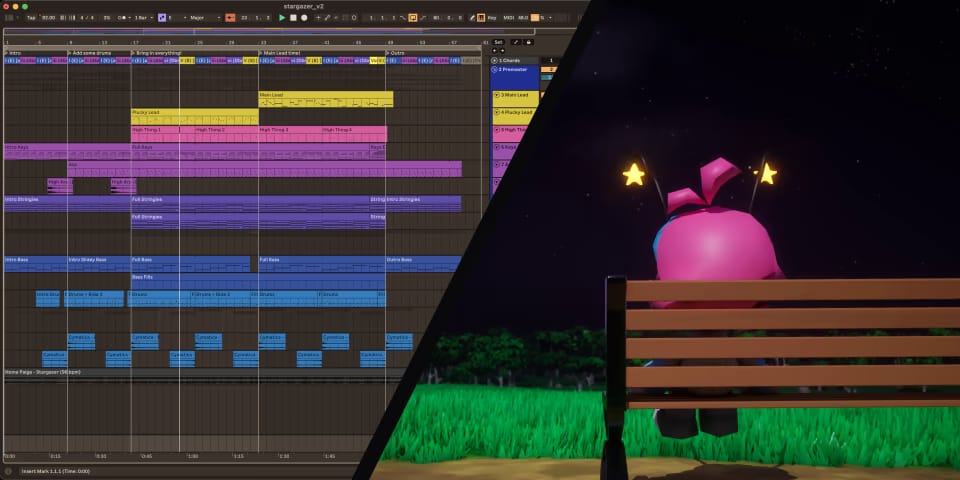
The making of “gaze upon the stars”
Published on
•17 min read
Heads up!This blog post may be a bit rough around the edges, as writing long articles like this isn’t exactly my strong suit. If you’ve got some feedback, don’t hesitate to post it in this GitHub thread!
About a month ago I put out on SoundCloud what is likely one of my best songs yet: gaze upon the stars, a cover of Stargazer from the soundtrack of an unreleased indie platformer called Home Paige. I’d highly recommend you check out the original song, because this cover obviously wouldn’t exist without it.
To be more specific, this song is an improved version of a cover I originally published about… 3 months ago already? Wow, time sure flies when you’re busy… Anyway, I recently released the accompanying music video on YouTube, and to celebrate I will go over some behind-the-scenes details regarding the cover and its Ableton Live project.
What’s a “Home Paige”?
Hey!If you don’t need to know what Home Paige is, you can go ahead and jump to the next section here.
Home Paige is a platformer game from indie game studio Minimin, set to take place in a 90’s operating system. At the time of writing it’s not out yet, however Minimin hopes to bring out Chapter 1 somewhere in the second half of 20261.
In the meantime, there is a little tech / movement demo that you can try out on Steam. It only supports Windows, but it should also run perfectly fine on Linux with the help of Proton. The final game, when it releases, will have native Mac and Linux versions1.
(Stargazer is present in this demo; it plays when you reach the end, and can also be listened to in the Playground.)
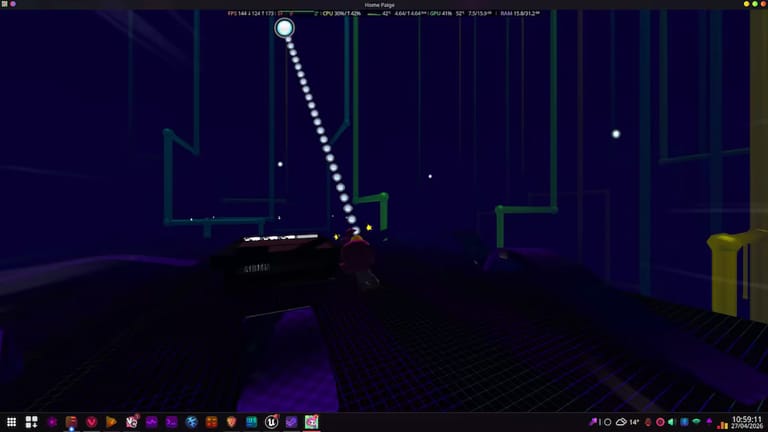
The Home Paige demo running on Linux using the Proton compatibility layer. Man, I forgot how dark the Pipes environment is…
The Home Paige demo running on Linux using the Proton compatibility layer. Man, I forgot how dark the Pipes environment is…
Now, what is there to like about this game? Let’s see…
-
It’s got a high paced, intricate movement system that is quite fun to play around with, even if my skill issue doesn’t let me make the best use out of it. It took me an embarrassingly long amount of time to get that screenshot…
-
It has a quite playful art style, with graphics that are very much reminiscent of early 3D platformers, while also being semi-modern at the same time. It’s definitely something special.
-
The soundtrack also captures the same playful vibe, making use of instruments ranging from chip sounds to synthesizers to straight up MIDI instruments. That last one’s quite fitting if you consider how prevalent MIDI files were in the time period this game’s taking you back to.
-
There are a lot of hidden references, such as the Pipes stage looking like the 3D Pipes screensaver from the olden days, and the MIDI sounds I just mentioned. Some even connected parts of the OST with old startup sounds and menu music. Heck, it even has a song called Startup.
All of that gives the game its charm, which resonates with me quite a bit, but some of you may have mixed feelings towards. If that’s how you feel, so be it; if not, then perhaps you should check out the demo linked above.
How I discovered it
This might be a bit unusual. You see, at the start of December 2025, I was bored and felt like booting up Garry’s Mod for some reason. I wanted to get more playermodels, and when I got a few pages deep, I stumbled into this playermodel of Paige (which I believe was made by a Home Paige Discord member). I thought to myself, “that seems cute, I’ll grab that”.
After playing with that playermodel for a few days – remembering the description of that addon mentioned a demo – I figured I would try out that demo, and I was quite impressed by it. Which is impressive by itself, since I’m not the biggest fan of platformer games (…because I suck at them).
Fast-forward to today, and I’ve grown a bit of an obsession with this little game. I would’ve even backed their Kickstarter campaign, but sadly I missed it by a few weeks, so instead I choose to contribute to the Home Paige community by making these covers.
The Discord server members like them a lot, and even Rapwned, the original creator of Stargazer, was a fan of the not-as-good original version:
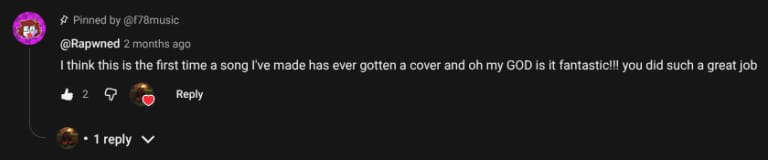
The comment Rapwned left on my original Stargazer cover from 3 months ago. You can see the original comment for yourself right here.
The comment Rapwned left on my original Stargazer cover from 3 months ago. You can see the original comment for yourself right here.
Alright, it’s time to stop being a Home Paige fanboy for a moment. Let’s talk about what you’re actually here for, which is how I made this cover.
Chapter 1: The Song Itself
Now would be a good time to mention the original Ableton Live project for this song is available for free in my public Nextcloud folder. It contains a lengthy README that should help you get everything you need to explore that project for yourself. The project files themselves are located in the Ableton Projects folder, as stargazer Project.zip.
Hey!The clips below were recorded in Live 12.4. However, the project files will also work in Live 12.3(.6+).
If you pay close attention, you can see in the clips that Chorus-Ensemble instances have the Time and Taps parameters introduced in 12.4.
However, if you’re reading this, chances are you don’t want to bother with all of that. So here we go!
Chords
The song is in the key of E Major. For the chord progressions I ended up treating the bass notes as the root note of each chord, which sounded the most correct to me. That resulted in the following progressions:
For the intro and outro:
| I | – | iii |
|---|---|---|
| E | – | Abm |
For the remainder of the song:
| I | – | iii | – | vi | – | V |
|---|---|---|---|---|---|---|
| E | – | Abm | – | Dbm | – | B |
The arpeggios additionally add various flavours of extensions to these chords. I also threw in a sneaky Vsus4 (Bsus4) chord just before the outro, which changes to the V (B) chord right after. Normally that chord sequence would be quite cliché, however it’s pretty subdued here, and chances are most of you didn’t immediately notice the chord changed in the first place.
Rhythm
The cover’s base tempo is 92 beats per minute, 4 less than the original’s 96. However, the final version was actually slowed down by another 4, resulting in a tempo of 88 bpm. More on that at the end.
The instruments are generally locked to 8th notes, with an exception being the keys during the intro part. The drums, however, are more interesting; they contain some triplets, but those triplet notes are slightly early, as can be seen in the pattern below.
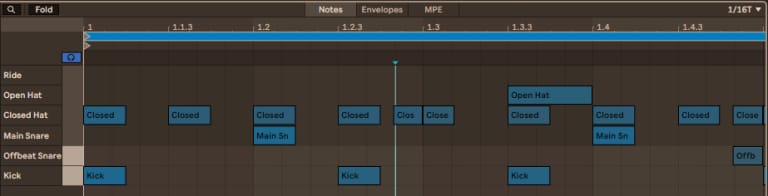
The first bar of the main drum pattern. Notice how the triplet notes are slightly off the grid.
The first bar of the main drum pattern. Notice how the triplet notes are slightly off the grid.
Of course, having everything else be on the grid isn’t very lo-fi. To loosen it up a bit, there’s a Groove applied to the project, which randomly offsets all the notes just a tad.

Sounds
Now it’s time that I go over all the sounds in this cover, in no particular order. There’s quite a bit to go through, so strap in!
Keys
This is likely the very first sound you notice. The tone is produced by Wavetable, and is automated to get brighter as the song progresses, as well as a bit quieter to make room for the melodies. It’s also layered with some microcassette noise from Cymatics, whose pitch has been matched to the notes that are being played. To top it off, there are some effects like a chorus, Dynamic Tube, and Spectral Blur for some unique reverb.
The notes are not quite the same as the original. For instance, during the intro, this instrument repeatedly plays a Iadd9 (Eadd9) chord in the original, which clashed a little too much with the iii (Abm) chord in this cover. I therefore adjusted those notes to fit in better.
And for the rest of the song, I only discovered the notes were deviating from the original late into making the second version of the cover. Changing them to match just didn’t sit right with me, so I left them. And of course, the last part before the outro was changed to account for the chord switch-up.
For some reason, I cannot stop associating this pattern with Dire, Dire Docks, which, coincidentally, I have also made a cover of. But that’s enough self-promotion for today…
Arp
This instrument comes in along with the drums, and, well… just look at how much there’s going on here:
That was a lot to take in. Let’s break it down step by step.
-
We immediately start off with something special. There’s an instance of Chord that, with the help of Expression Control randomizing the Strum and Velocity parameters for each incoming note, randomly sprinkles in some extra notes. The Chance also increases over time, for even more sprinklage!
-
The sound is again produced by Wavetable. It becomes brighter and longer over the course of the song.
-
There’s an instance of EQ Eight to filter the arp during the outro. But that’s not very important.
-
Now here’s something juicy:
- We have a Grain Delay modulated by an LFO to create a burst of grains every 2 bars, again automated to get brighter.
- There’s also a Chorus on the other chain to widen the sound some. The grains aren’t affected by it, but now that I think about it, maybe they should’ve been…
-
Finally, there’s a homemade tape delay effect, appropriately named Tape Delay at home:
- The first effect in the chain is iZotope Vinyl, which brings a touch of lo-fi to the delay. Quite literally, in fact, because its Lo-fi option is enabled, adding some sampling artefacts.
- Those artefacts turned out to be a bit too intense, though. Thankfully we’ve got TDR Nova
(a dynamic EQ plugin) to tone ‘em down.
This actually flew under the radar at first, because the headset I normally use (the HyperX Cloud Alpha’s) didn’t pick them up very well, which is fair considering they’re not exactly made for music production. I did notice them later though, when listening to the song on my phone through my JBL Live 770NC’s.
And yes, I know I could’ve just used Redux, which has a dry-wet option, but it’s too late now.
- The actual delay effect is provided by Echo, configured to add some additional noise, wobble and reverb. Its delay time is also modulated very slightly, although I’m not really sure why I did that. Oh, and you bet the delay also grows as the song progresses!
Alright, now you should hopefully understand how this sound works. One more thing I did was resample the sound on a new track, which was then drowned in reverb and faded in right before the actual arp kicks in. I repeated this before the start of the next section as well.
Drum…
I wanted the drums to be a lot more prevalent in this cover. The simple kick-snare-hat loop that sits in the background of the original Stargazer wasn’t going to suffice for that, so I needed to add some variety.
For starters, I brought in some additional drum sounds: a secondary offbeat snare, an open hi-hat, a ride cymbal, and lastly, a reverse crash. Then, I produced a few extra drum fills (the original only had 2 of them). And of course there’s your fair share of effects, like reverb, saturation and some automated filters.
The drum sounds are a mixture of free Cymatics and stock Ableton samples. I’m not qualified to make my own yet, nor do I want to spend money on samples (because why would I do that when I only make free music?).
Drum Reverb
I want to briefly touch on the reverb for a bit. It’s powered by Hybrid Reverb, which is probably my favourite reverb effect that’s built into Live Suite. You’ll definitely be seeing more of it later.
Hybrid Reverb has a Vintage slider, which adds effects like sampling artefacts and bitcrush, quite appropriate for a lo-fi song. Here that slider is set to Older, which makes the bitcrush quite noticeable, especially with the saturation that follows it. Listen closely, and you’ll hear what I mean:
…& Bass
I don’t really need to talk too much about the bass sounds here. They both use Wavetable, and sound quite similar to the original song, probably the most similar of any sound in this cover. And that’s simply because they work well. There’s no need to change them.
There’s just a few things I want to mention. The reese-like bass that plays almost the entire time has a fair bit of subtle randomness going on, especially from the Shimmer unison algorithm. The softer, higher-up fills are also actually a separate sound that uses chorus instead of unison. And lastly, both sounds make use of a sub oscillator for a bit of extra oomph.
I usually add sidechain to bass sounds to avoid muddying up the mix too much. And while I technically did do that for this cover, I found that the pump effect you’d associate with sidechain didn’t fit in this cover, so it never ends up reducing the volume by more than about 2 dB.
Strings
This sound is made up of 2 layers. First is actually some real strings from the stock Ableton String Quartet pack, that are played incredibly softly. They’re pretty subtle in the full mix; the intro is probably the part where you notice them the most. Second is yet another Wavetable synth, with a tone mildly inspired by Andrew Huang’s HOLY.
You may find this hard to believe (or you may not), but my sound design skills are not quite up to his level. So instead, we’ve got some effects to compensate: a Phaser and a Spectral Resonator. Together they contribute to this sort of “slushy” sound that this second version of the cover ended up with.
One of the notes in the strings was much louder than the others for some reason. And that note just so happens to be in 3 of the 4 chords in this song. So I again used TDR Nova to tone it down.
Choir
Sure enough, it’s more Wavetable. In fact, I’m going to stop mentioning it now, because as it turns out, every single instrument uses Wavetable.
Now, some might not find the choir as good when listening to it in isolation, like below. You can also say this about some of the other instruments. However, what’s more important is that it works in the final mix, and I’d say that’s the case. And it does still help with the song’s slushy sound, especially with those effects.
The High, erm… Thing
Okay, now we’re talking. Well, there’s actually not that much to talk about here; it’s a surprisingly simple synth sound (try saying that three times fast…) that’s constantly being panned around and is absolutely drenched in reverb.
Remember how I mentioned earlier you’ll be seeing more of Hybrid Reverb? Well, you actually already saw it with the previous sound, but this is where Hybrid Reverb’s Shimmer algorithm truly shines. It adds a lot to this sound. Don’t believe me? Have a listen to this side-by-side comparison:
One important thing is that the reverb trail is greatly extended when the outro kicks in. You can still hear it when the second chord hits, and I’m quite fond of that, to be honest.
Plucky Melody
In the first version of the cover, this sound was very similar to the original Stargazer. Not in the second version, though. What makes this iteration of the sound distinct is the rather extreme filter LFO that’s on it, which is accentuated further by the feedback-y chorus. That ends up bringing out this song’s… slushiness even more.
The filter and effects in action.
The Final Melody
The song has been building up to this moment. It better sound good.
Well… as it turns out, that wasn’t really the case at first. It was an octave higher to match the original song, and that ended up sounding pretty grating; enough to turn a few people off. And it used to be even worse too, which made someone in the Home Paige Discord server complain about it when I shared the very first early version of the cover.
It was clear to me that this sound needed some changes. So in this new version of the cover, it has been dropped down an octave and toned down a bunch, along with a few more tweaks. That was enough to make this sound a whole lot better. Sure, there’s always room for further improvement, but that’s where I start running into my sound designing limits.
This is why feedback is important! Again, if you have some feedback on this article, post it on GitHub. Don’t be shy (like me).
The higher octave is actually still there, but it now sits far in the background. There’s also some subtle bitcrush and sampling artefacts, so subtle that you probably didn’t even notice it until now. And then we’ve got the usual chorus, delay and reverb. A lot of those last 2, in fact.
And like the high… thingamajig (man, I really need to come up with a better name for this…), it also ends with a drawn out reverb trail, to accentuate that effect even further.
Gluing it all together
It’s not lo-fi hip hop if it isn’t lo-fi. And that’s a fact. For this, I grouped all the tracks together and added a side of iZotope Vinyl. You’ll have no doubt noticed it in the last few clips, since it’s the source of the vinyl crackle. There’s also a soft clipper on the master to catch and slightly warm up any volume peaks.
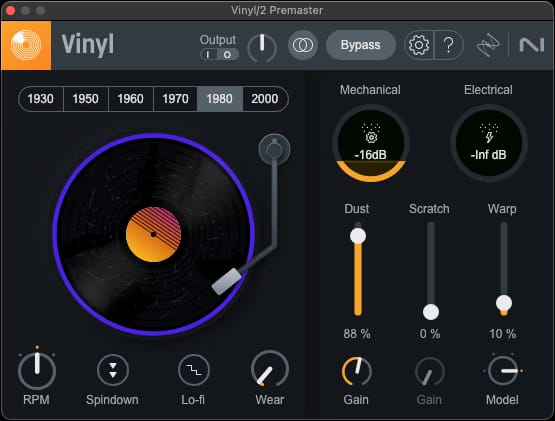
The Vinyl settings for this cover. I also used Spindown at the very end.
The Vinyl settings for this cover. I also used Spindown at the very end.
Finally, for that last touch of lo-fi, I slowed the final export down by 4.348% in Audacity. That’s why the clips in this blog post sound a bit different compared to the actual cover. Well, that and the many layers of randomness.
Why 4.348%, exactly? Well, I actually told you already; that’s because this percentage is what’s needed to bring down the tempo to a nice round number of 88 bpm. You really wouldn’t want to end up with fractional BPM here, because those are a meme.
The Nextcloud folder’s README already goes into more detail about this process, so I won’t cover it again here.
Conclusion
Those were a lot of interesting sounds. Again, perhaps not the best in isolation, but they do come together to form a quite good song, if I do say so myself. And of course, this wouldn’t be possible without the original Stargazer, so big thank you to everyone at Minimin!
In case you need a reminder of what the final song sounds like, or you just want to look at it through the fancy new visualizers I added to the website, here you go:
I initially wanted this blog post to cover both the song and its music video, however because it has been spiralling out of control I decided to split it up into 2 parts. The next part, which will be all about the music video, will be released… well, I don’t know, to be honest. Probably next month at this rate…
That’s all I’ve got for you today. See you next time!
Footnotes
-
Referenced from Minimin’s post-campaign update on Kickstarter. ↩ ↩2